On-page SEO plays an important role in improving your website’s visibility, attracting organic traffic, and helping search engines understand your content. However, for beginner bloggers, optimizing a blog post can feel confusing.
There are several factors to consider. Write SEO friendly meta tags with appropriate keywords, and optimize images using alt text. Add internal links to related pages on the website.
The lack of key information can make it hard for search engines to understand your pages and for readers to find the information they are looking for.
There’s an on-page SEO checklist 2026 that comes in handy. It makes sure that you don’t miss any important steps and helps you follow a clear path to optimize your content. From keyword placement, heading structure, meta descriptions, optimizing images, mobile usability, and page speed, this checklist has it all.
Beginner bloggers, students, freelancers, or small business owners can use this checklist before publishing a new blog post and when updating existing content to improve their on-page SEO efforts.
What Is On-Page SEO?
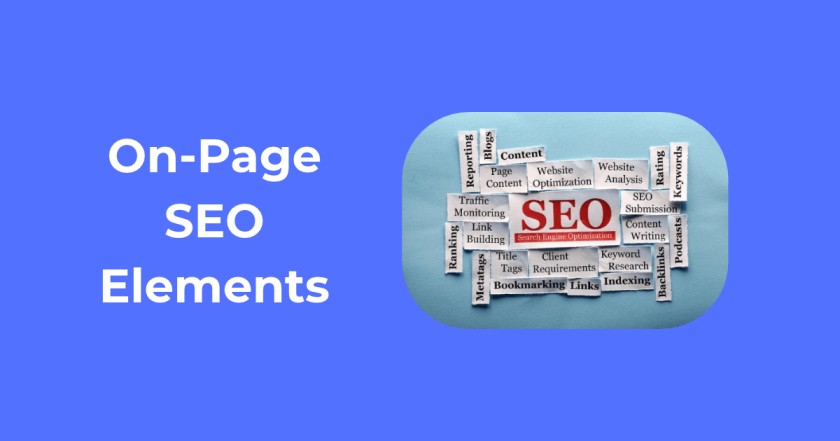
On-page SEO is the process of optimizing individual web pages to improve their visibility in search engines like Google and attract relevant organic traffic. It involves making changes to the content, HTML code, links, images, and overall user experience.
The main purpose of on-page SEO is to make it easier for search engines to understand your content and to make it more useful to your readers.
Key elements include:
- optimizing title tags
- meta descriptions
- headings
- URLs and image alt text.
Incorporating your target keywords into the content naturally helps search engines understand the topic of your page.
Internal linking connects related articles on your website, making it easier for visitors and search engines to discover useful information. Optimizing the content, usability, mobile-friendliness, and page loading speed are also important to provide a better user experience.
On-page SEO is one of the most practical ways to improve search performance without relying entirely on backlinks, and is a great choice for beginners and bloggers. But even the best optimization is not enough to ensure better rankings, as many factors are taken into account by search engines.
An effective on-page SEO strategy can help you develop helpful content, boost search visibility, and increase the chances of attracting the right audience.
How On-Page SEO Works
Search engines use several signals to understand a webpage, determine its topic, and decide when to display it in search results.
On-page SEO can help search engines interpret these signals. First, search engines analyze page content to identify the main topic, related keywords, and the information users can expect to find.
The title tag provides an important clue about the page’s subject, while headings such as H1, H2, and H3 organize the content into clear sections.
Search engines examine internal links to find additional pages on your site and to discover how different topics connect. Include external links that can help readers explore other resources or get more information.
Other signals include:
- URL structure
- image alt text
- structured data
- mobile-friendliness
- page loading performance
Search engines use links to find new pages and determine the relationship between websites.
Search engines assess whether a page meets a user’s search intent by evaluating its content quality, relevance, originality, and usefulness.
But there is no definitive indicator that will ensure higher rankings. Search engines combine multiple signals to understand a webpage and determine its relevance to a particular search query.
By applying effective on-page SEO practices, you can make your content easier for search engines to interpret while providing a better experience for your readers.
Why On-Page SEO is crucial in 2026?
The On-Page SEO Checklist 2026 is more relevant than ever, as search engines have become better at understanding content quality, user intent, and page experience.
By optimizing your page to provide relevant content that aligns with what people are searching for, you can ensure that your content remains relevant.
It’s also beneficial for the discoverability of your webpage, allowing search engines to crawl, index, and show your pages for relevant keywords. Readability is another major factor.
By using clear headings, short paragraphs, simple language, and logical formatting, visitors can find answers to their queries.
User experience also plays a big role: with fast loading times, mobile-friendly layouts, easy-to-navigate pages, and accessible images, users can enjoy browsing the web on any device.
Search engines use these signals to better understand your content, including titles, headings, internal links, image alt text, and structured information.
Together, these elements provide context about your page and how it relates to other content on your website. An On-Page SEO Checklist 2026 can help you create a page that is more readable for your users and search engines.
Although many factors determine the ranking, having a properly optimized website can help you earn consistent organic traffic as well as long-term website authority.
On-Page SEO Checklist 2026: 22 Steps to Optimize Your Page
1. Understand search intent
Understanding search intent is an essential step when using the On-Page SEO Checklist 2026 to optimize your content.
When you are looking for a specific keyword, the first thing you should do is figure out what your target audience wants to learn, solve, or achieve.
Now check the Google search results to see what kinds of content are ranking, and what questions the search results are answering.
Use an appropriate format based on the search intent:
For example:
- A detailed guide
- Checklist
- Step-by-step tutorial
- Comparison
- Product review.
Most importantly, address the reader’s primary question early in your introduction.
This helps visitors find relevant information quickly and improves the overall reading experience.
2. Choose the right primary or focus keyword
- Select a keyword relevant to your topic and audience.
- Check search volume, keyword difficulty, and search intent.
- Consider long-tail keywords with more specific intent.
- Avoid targeting the same primary keyword on multiple competing pages.
3. Use your focus keyword naturally in headings and content
- Include the keyword in the introduction where it fits.
- Use it in a relevant heading if appropriate.
- Include related words and synonyms naturally.
- Don’t overstuff keywords or make up for the keyword-density target.
4. Write an SEO-friendly title tag
- Make a distinctive, descriptive title.
- Use the primary keyword naturally near the beginning of the introduction
- Clarify the purpose of the benefit to the audience.
- It should be short, with about 50-60 characters as an editorial guideline (and not a Google limit).
If you are looking for an example, the On-Page SEO Checklist 2026: 22 Steps to Rank Higher is a great example.
5. Create a compelling H1 heading
Your H1 heading is the main title readers see on your webpage. It should clearly communicate what your content is about and encourage visitors to continue reading.
If you follow the On-Page SEO Checklist 2026, you should have one clear and descriptive H1 heading that describes the main topic of the page. Make it consistent with your SEO title tag, so that readers and search engines can easily understand your content.
Put your main keyword naturally in the heading. Never do keyword stuffing or make the heading so long that it doesn’t make sense or fit the criteria. A relevant H1 heading that is reader-friendly helps make your content more understandable and well-structured.
6. Optimize your meta description
A meta description is a summary that tells readers what your webpage is about before they click on it in search results.
Create a description that is clear and engaging, accurately reflects the content of your page, and provides visitors with a reason to read your article.
Include your focus keyword, On-Page SEO Checklist 2026, naturally without forcing it into the sentence. Highlight the main benefits readers will gain, such as practical tips, actionable steps, or useful information.
Your meta description should be concise and easy to follow; 150 to 160 characters is a good rule of thumb. A good description will help you get clicks from the relevant search results.
7. Create a clean, descriptive URL
A clean, descriptive URL helps both search engines and visitors understand what your webpage is about before opening it. When creating a URL, keep it short, simple, and easy to read.
Include your primary keyword or a few relevant words that accurately describe the page content. The URL should be relevant to the content of the article.
For instance, if your article is about an on-page SEO checklist, a good URL would be `yourwebsite.com/on-page-seo-checklist. Include hyphens (-) to separate individual words in the URL to make it easily readable and understandable.
Avoid using unnecessary numbers, special characters, random letters, or complicated parameters that make your URL confusing. Also, avoid adding dates unless it adds value to your content, as dated URLs may become less relevant if you are updating your content.
If possible, create a meaningful URL before publishing your article. Changing an existing URL requires proper 301 redirects to prevent broken links and preserve SEO value.
A well-structured URL improves navigation, makes links easier to share, and gives search engines additional context about your page.
8. Structure content with H2 and H3 headings
Organize your article using clear H2 and H3 headings to make it easier for readers to navigate and understand your content. Divide the article into logical sections, with each H2 heading covering a main topic.
Use H3 headings under relevant H2 headings to explain supporting points in more detail. Write descriptive headings that tell readers what each section covers and help them quickly find the information they need.
Maintain a natural heading hierarchy and avoid skipping levels unnecessarily. Don’t repeat the same keywords in every heading just to improve keyword density. Be clear, relevant, and readable.
A properly organized article can also make it easier for the search engines to understand how various parts of your content are connected.
9. Write Helpful, Original Content
Creating helpful and original content is one of the most important steps in following an effective on-page checklist 2026. Your primary goal should be to answer the reader’s questions thoroughly and provide information they can actually use.
Don’t copy and paste content from other websites. Incorporate examples, real-life experiences, personal observations, and actionable tips to enrich your article. Explain difficult concepts in simple language so that it is easy to understand for beginners.
Ensure that you have the correct and current facts, statistics, tools, and recommendations. When creating content with AI, ensure it is thoroughly reviewed and edited. Include your own insights, verify important information, and remove sections that are generic and/or repetitive.
Most importantly, write people-first content that addresses readers’ problems, rather than writing lengthy articles just to reach a specific word count. Quality, relevance, and usefulness matter more than article length.
10. Cover related questions and subtopics
1. Identify Important Subtopics That Readers Expect
Cover related topics that readers naturally expect to find. For an on page seo checklist 2026, include keyword placement, internal linking, image optimization, content quality, and user experience.
2. Use Relevant Secondary Keywords Naturally
Use appropriate secondary keywords throughout the content naturally. Use related terms like on-page SEO techniques, content optimization, title tags, and meta descriptions.
3. Respond to common questions of the readers
Reply to the questions readers may have after reading your blog. Share SEO tips, highlight common mistakes to avoid, and explain how to use the on-page SEO checklist 2026 effectively.
4. Don’t add unrelatable sections just to make the article longer
Maintain a focus on the main topic. Avoid unnecessary sections, repetitive explanations, or unrelated keywords. Prioritize useful information over word count to deliver a better reading experience.
11. Improve readability and content formatting
1. Make your paragraphs reasonably short
Break your content into short paragraphs of 2–4 sentences to make it easier to read and understand. When following an on-page SEO checklist 2026, use simple language and avoid long blocks of text. Short paragraphs help readers scan your article, find important information, and enjoy a better reading experience, especially on mobile devices.
2. Use Bullets and Numbered Steps Where Useful
Use bullet points to highlight important information, tips, and key takeaways. Use numbered lists when explaining processes, instructions, or step-by-step SEO techniques. For instance, For example, you can present your on page seo check list 2026 as numbered steps to make it easier to read and follow.
3. Technical Terms should be explained the first time they come up
Don’t assume that every reader understands SEO terms. Explain technical terms in simple language when you first introduce them. For example, describe a title tag as the clickable headline that usually appears in Google search results and alt text as a description of an image used by search engines and screen readers. This helps to make your article easy to read for beginners.
4. Use Tables and Examples to Make Information Easier to Understand
Explain complex information with the use of comparison tables and practical examples. For example, make a table that shows the poorly optimized title tags, meta descriptions, or URL versus the well-optimized. You can also include real-life examples in your on page seo check list 2026 so that your audience can see how each of the SEO strategies can be used on their website.
12. Add relevant internal links
1. Link to Related Articles on Your Website
Add links to other relevant articles on your website wherever they provide additional value to readers. Internal links help visitors discover related content and encourage them to explore more pages on your website.
2. Use Descriptive Anchor Text
Anchor text refers to the clickable text that directs people to another webpage. Use clear, descriptive words that tell readers what to expect after clicking the link instead of generic phrases like “click here” or “read more.”
3. Link From Relevant Older Articles to the New Page
Whenever you publish a new article, find relevant older posts and add links pointing to the new page. This makes it easier for readers to find your latest content and can help search engines find it on your existing pages.
4. Ensure that important pages can be reached via internal links.
Link your important pages to other related pages with internal links. Avoid leaving valuable articles as orphan pages, which are pages with no internal links pointing to them. This makes your website easier to navigate and helps search engines discover your content.
13. Include useful external links
1. Cite reliable sources for facts and statistics
Use trusted websites, industry reports, and research studies to support the facts and statistics in your article. This helps readers verify the information and builds trust in your content.
2. Link to original research and official documentation
Whenever possible, link directly to original studies, research papers, and official websites. This allows readers to explore the information in more detail and find accurate answers.
3. Make sure each external link adds value
Only add links that help readers understand the topic better or find useful information. Avoid linking to unrelated websites or adding too many unnecessary links.
4. Use appropriate link attributes for sponsored or untrusted links
Use rel="sponsored" for paid or affiliate links and rel="nofollow" when you don’t want to endorse or pass ranking credit to a linked website. Search engines can understand the nature of your external links.
14. Optimize images and image alt text
1. Use relevant and clear images
Choose high-quality images that support your content and help readers understand the topic. Avoid adding decorative images that don’t provide any real value to the page.
2. Give files descriptive names
Rename image files using clear, relevant words before uploading them to your website. For example, use on-page-seo-checklist. webp instead of a generic name like IMG1234.jpg.
3. Write informative alternative text descriptions for images.
Describe images with alternative text that shows and why it is relevant to the content. This helps screen readers describe images to visually impaired users and provide some context for search engines.4.
4. Compress images and use suitable dimensions
Reduce image file sizes before uploading them to avoid slowing down your website. Use the right image size and employ modern image formats, such as WebP or AVIF, to ensure high-quality visuals and faster load times.
5. Add captions if helpful in explaining the image
Use captions to provide additional context, explain important details, or identify the source of an image. Keep captions short, relevant, and useful rather than repeating information already covered in the surrounding text.
15. Optimize image file size and format
1. Use Appropriate Formats (e.g., WebP or AVIF, if available)
Use modern image formats like WebP or AVIF to reduce file sizes without noticeably affecting image quality. These formats might be able to speed up your website in comparison to traditional formats such as PNG or JPEG.
2. Don’t use unnecessarily large image files
Compress images before uploading them to your website to reduce their file size. Avoid using high-resolution images when smaller versions are sufficient for your page layout.
3. Use Responsive Image Sizing
Use responsive images that automatically adjust to different screen sizes and devices. This prevents mobile users from downloading unnecessarily large images and helps improve page loading performance.
4. Test the Page After Making Changes
After optimizing your images, check your webpage on both desktop and mobile devices. Make sure images load correctly, maintain their quality, and don’t negatively affect the page layout or loading speed.
16. Improve mobile usability
1. Check That the Text Is Readable on Small Screens
Make sure your website text is easy to read on smartphones and other small devices. Use an appropriate font size, clear headings, and enough spacing between lines so visitors don’t need to zoom in to read your content.
2. Ensure Buttons and Links Are Easy to Tap
Make buttons and clickable links large enough for users to tap comfortably with their fingers. Maintain sufficient spacing between clickable elements to prevent accidental clicks and improve mobile navigation.
3. Avoid Horizontal Scrolling
Design your webpages to fit different screen sizes without forcing visitors to scroll horizontally. Use flexible layouts, properly sized images, and responsive design elements to keep your content within the screen width.
4. Test Tables, images, navigation, and forms on mobile devices.
Test your tables, images, menus, and contact forms on a phone and tablet. Test to ensure everything displays correctly, works as expected, and provides a smooth browsing experience across different screen sizes.
17. Improve page speed and Core Web Vitals
1. LCP (Largest Contentful Paint)
LCP measures how quickly the largest visible content element, such as a main image or heading, loads on a webpage. Improve LCP by compressing large images, using faster hosting, and reducing unnecessary scripts that slow down page loading.
2. (INP) INP refers to the Interaction to Next Paint metric.
INP measures the responsiveness of a website to user interactions like clicking a button, opening a menu, or submitting a form. Optimize INP by minimizing the amount of unnecessary JavaScript. Also, optimize scripts and make interactive components respond quickly.
3. CLS (Cumulative Layout Shift)
CLS measures how much a webpage’s layout moves unexpectedly while loading. For example, an image appearing without reserved space can push text down the page. Improve CLS by specifying image dimensions, reserving space for advertisements, and avoiding unexpected layout changes.
18. Check canonical tags and duplicate content
1. Check if the page has the right canonical URL
A canonical tag tells search engines which version of a webpage you consider the preferred version. Make sure your page points to the correct canonical URL to help prevent confusion when similar versions exist.
2. Avoid Accidentally Publishing Multiple Versions of the Same Content
Make sure that you don’t have duplicate or close-to-duplicate content on different URLs. Duplicate pages can make it more difficult for search engines to determine which page to show in the search results.
3. Review URL Variations and Duplicate Pages
Check for URL variations caused by parameters, trailing slashes, HTTP/HTTPS, or www/non-www versions. Make sure these variations are handled correctly to avoid unnecessary duplicate pages.
4. Understand That Canonical Tags Are Signals, not guarantees
Canonical tags suggest which URL search engines should treat as the preferred version. However, Google considers them signals rather than strict instructions and may select a different canonical URL based on other factors.
19. Check indexing and crawlability
1. Confirm That the Page Is Not Unintentionally Blocked From Indexing
Make sure your webpage is accessible to search engines and is not accidentally marked as noindex. If a page is blocked from indexing, Google will not show it in search results.
2. Review Robots Meta Directives
Robots meta directives give instructions to search engines on how to crawl and index your webpage. Check that you haven’t accidentally added directives such as noindex or nofollow that could prevent proper indexing or link discovery.
3. Use Google Search Console to inspect the website URL
Use the URL Inspection tool in Google Search Console to check whether your webpage is indexed. It also helps you identify indexing issues and request indexing when your page is ready.
4. Inspect Internal Links and Verify the Page Can Be Discovered
Make sure your new page has relevant internal links pointing to it from other pages on your website. This helps search engines discover your content and understand its connection to related topics.
5. Understand That Publishing a Page Does Not Guarantee Indexing
Publishing an article doesn’t automatically mean Google will index it. Google decides whether and when to index a page based on factors such as accessibility, content quality, and its overall assessment of the page.
20. Use structured data where appropriate
1. Identify supported relevant Schema Types.
Choose structured data (schema markup) that accurately describes your webpage. For blog posts, use the Article schema, while Breadcrumb schema can help search engines understand your website’s page hierarchy.
2. Ensure Structured Data Matches Visible Page Content
Make sure the information in your schema markup matches what visitors can actually see on your webpage. Don’t include false, misleading, or inaccurate information just to get ranked.
3. Validate the Markup With Google’s Rich Results Test Where Applicable
After adding structured data, test your webpage using Google’s Rich Results Test to see if there are any issues or if the website is eligible for any rich result features. Fix all the problems before publishing and updating your article.
4. Never Promise That Schema Will Produce a Rich Result
Adding schema markup does not guarantee that Google will display rich results for your webpage. It helps search engines understand your content, but Google decides whether your page qualifies for enhanced search appearances.
21. Strengthen credibility and trust
1. Include Accurate Author Information
Add a clear author bio that explains who wrote the article and their relevant knowledge or background. This helps readers understand the author’s expertise and builds confidence in your content.
2. Show Relevant Experience or Practical Examples:
Use examples, practical tips, and personal observations to support your comments. If you have experience that is relevant to your content, share it; this will make your content more helpful and show that you know the subject.
3. Cite Trustworthy Sources
Provide links to reliable sources to support critical facts and statistics, including national sites, industry research, and original studies. This helps in making sure that information is accurate and gives credibility to your content.
4. Make necessary corrections and update information.
Review your articles regularly to correct outdated information, broken links, and factual mistakes. Update statistics, screenshots, tools, and recommendations whenever necessary to keep your content accurate and useful.
5. Ensure the purpose and contact information of the Website are easily accessible.
Clearly explain what your website offers and who it serves through an About page. Provide easily accessible contact information so readers, potential clients, and business partners can reach you when needed.
22. Add a useful table of contents and clear navigation
1. If you have a long article, add Jump Links.
Include a table of contents with clickable jump links for lengthy articles. This allows readers to move directly to the sections they want without scrolling through the entire page.
2. Use Descriptive Labels
Give each table of contents link a clear and meaningful name. Use labels that accurately describe the section so readers know what information to expect.
3. Make important sections easy to find
Organize your content with clear headings and a logical structure. Highlight important sections so visitors can quickly find useful information and navigate your article comfortably.
4. Check all Table-of-Contents links.
Test each jump link and ensure that it leads to the appropriate section. Fix broken or misplaced links to provide a smooth browsing experience.
Best On-Page SEO Tools for 2026
Using the right SEO tools can make website optimization easier and help you identify issues that may affect your search performance. You don’t need dozens of expensive tools to improve your website.
A few reliable tools can help you research keywords, monitor organic traffic, check page speed, optimize WordPress content, and identify technical SEO problems. Here are some of the best on-page SEO tools to consider in 2026.
Google Search Console
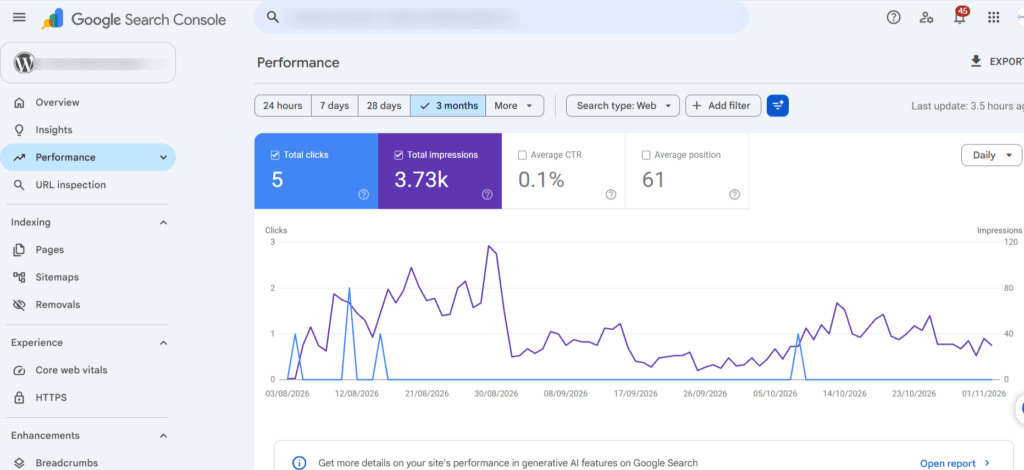
As part of your “on page seo checklist 2026”, use Google Search Console to understand how your website performs in Google Search. You can check which search queries bring visitors to your website, along with impressions, clicks, average CTR, and search positions.
It also helps you identify indexing issues, inspect individual URLs, and monitor page performance. Use this tool regularly to find pages that receive impressions but need better titles or content to attract more clicks.
2. Google Analytics 4
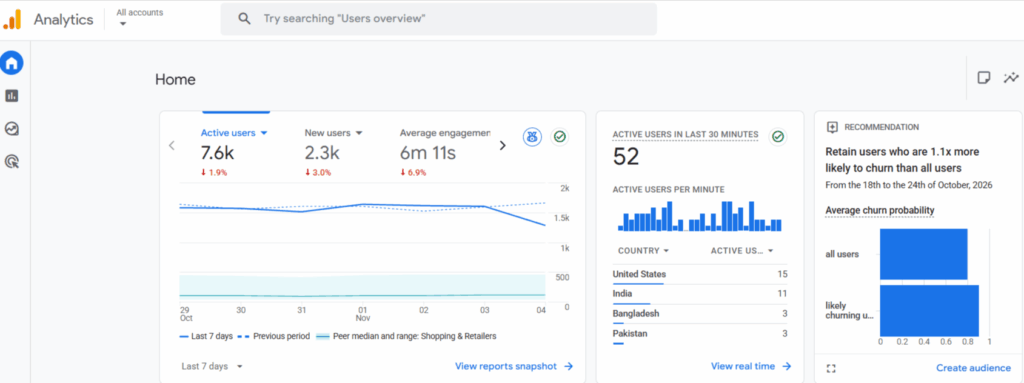
Google Analytics 4 (GA4) provides you with insight into the behaviours of visitors to your website. You can analyze organic search traffic, engaged sessions, engagement time, and important user actions.
These insights help you identify which blog posts attract visitors and which pages need improvement. It also helps you understand which content resonates with your target audience.
3. Google PageSpeed Insights
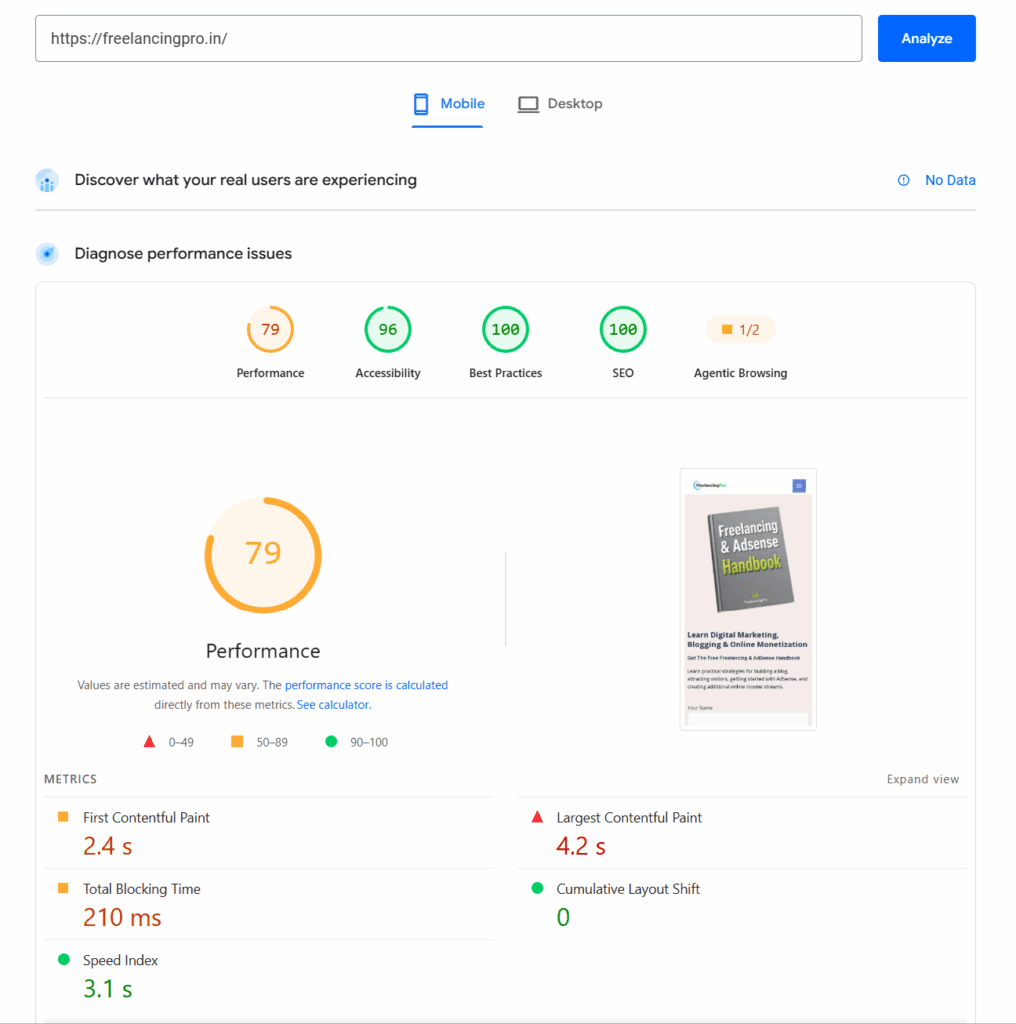
Google PageSpeed Insights analyzes how your webpage performs on desktop and mobile devices. It offers a few tips to make sites load faster and measures Core Web Vitals (LCP, INP, CLS).
Its recommendations will help you find issues you may have that impact user experience, including layout shifts, unnecessary scripts, and large images.
4. Semrush
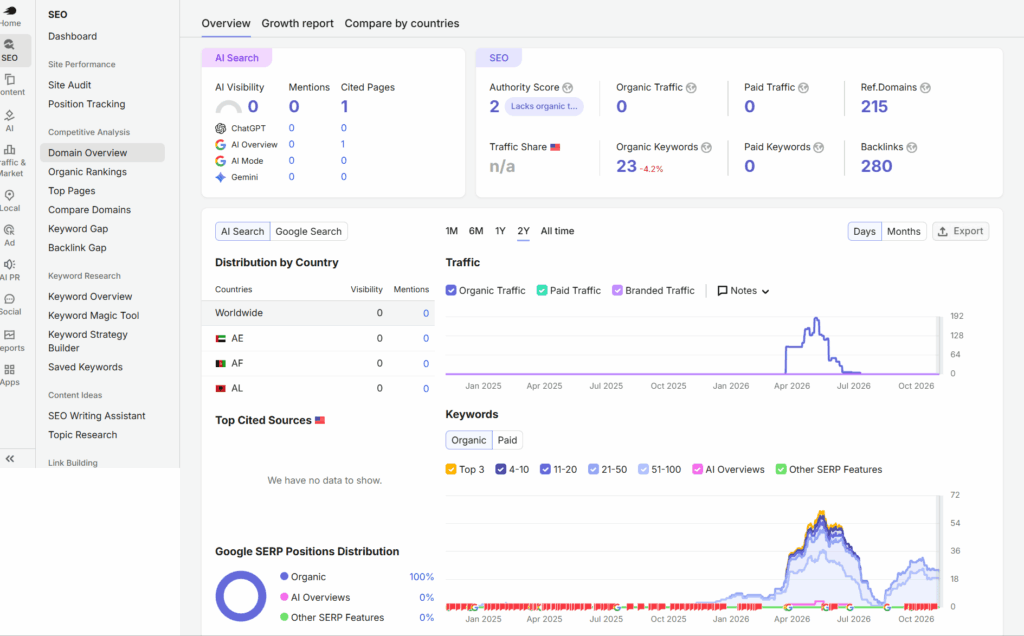
As part of your on page seo checklist 2026, consider using Semrush, a popular SEO platform for keyword research, competitor analysis, and on-page optimization. You can discover relevant keywords, check keyword difficulty, analyze competing websites, and identify content gaps. Its on-page SEO tools also suggest ways to improve your content based on your target keywords and competing pages.
5. Rank Math SEO
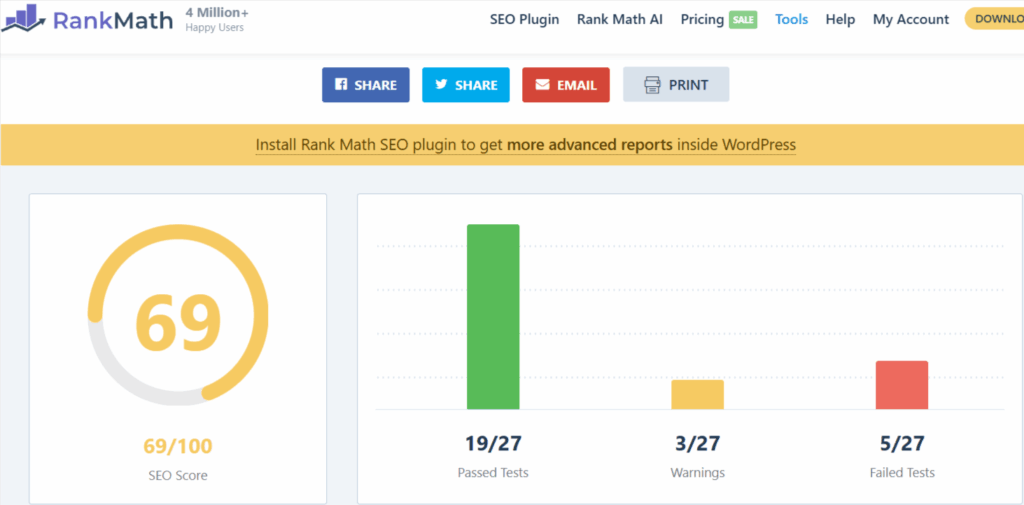
Rank Math SEO is a WordPress plugin that helps you manage important on-page SEO elements directly from your post editor. You can optimize title tags, meta descriptions, focus keywords, and canonical URLs
It also supports various schema markup options to help search engines in understanding your content. It is especially helpful for bloggers and web owners as it provides them with SEO analysis features.
6. Screaming Frog SEO Spider
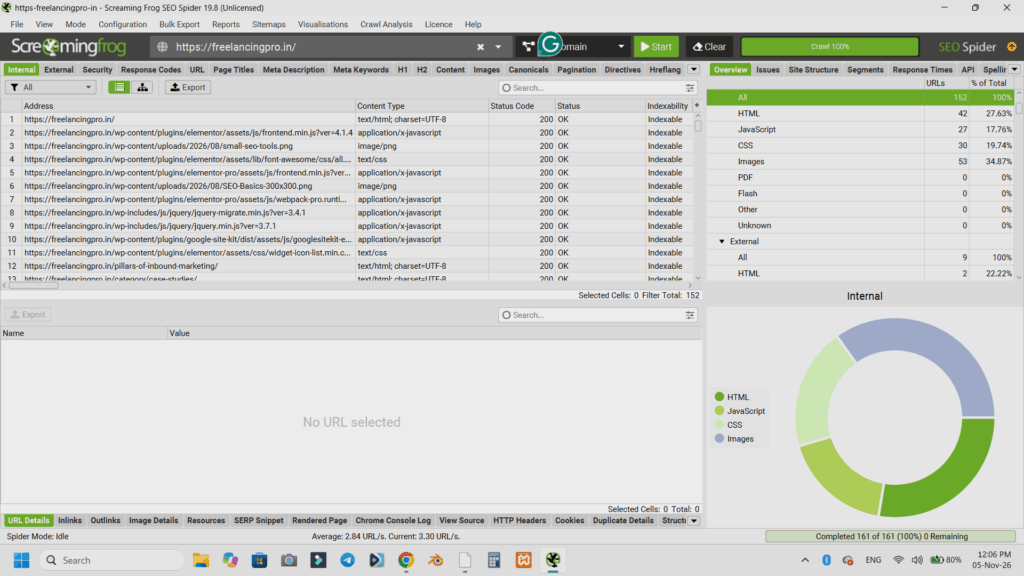
Screaming Frog SEO Spider is a website crawling software that detects technical and on-page SEO problems.. It can audit page titles, meta descriptions, headings, broken links, redirects, image attributes, and duplicate content
You can also use it to find missing SEO elements and review your website’s internal linking structure. It’s especially useful when auditing websites with multiple pages.
My suggestion: Begin with Google Search Console, Google Analytics 4, PageSpeed Insights, and Rank Math. These four tools provide a strong foundation to work on on-page optimization without having paid subscriptions.
Common On-Page SEO Mistakes to Avoid
Even if you follow the best SEO practices, a few common mistakes can affect your website’s search performance. Understanding these mistakes will help you create better content, improve user experience, and avoid unnecessary optimization problems. Here are some on-page SEO mistakes you should avoid in 2026.
1. Keyword Stuffing
Keyword stuffing means using the same keyword repeatedly more than required in your content to manipulate search rankings. This makes your content sound unnatural and may frustrate readers. Instead, try to use your primary keyword naturally and add variations of the keyword wherever they fit.
2. Creating content for Search Engines rather than Readers
Generic, repetitive, and unhelpful content doesn’t have value for readers. Don’t create content to satisfy search engine algorithms. Answer questions, share practical examples, and solve the problems of your audience.
3. Ignoring Internal Links
Internal links are used on a website to connect related pages. Ignoring them can leave important articles isolated, making it harder for visitors and search engines to discover your content. Link relevant articles using descriptive anchor text.
4. Mobile Usability & Page Performance.
A slow website, difficult navigation, and poorly displayed content can frustrate visitors. Ensure that your website loads quickly and functions well on mobile devices and offers a comfortable experience for visitors.
5. Expecting Instant Rankings
On-page optimization does not mean that you can get instant search rankings. Other factors like competition, indexing, content relevance, backlinks, and the overall quality of the website play a part in search performance. Be patient, monitor results, and keep improving your content over time.
How to Measure On-Page SEO Results?
Optimizing your website is only part of the SEO process. You also need to monitor performance and see if your efforts are giving results. Use the following methods to monitor your on-page SEO progress and identify areas that need improvement.
1. Track Performance in Google Search Console.
Use Google Search Console to monitor how your optimized pages perform in Google Search. Pay attention to these important metrics:
- Impressions and clicks: See how often your pages appear in search results and how many people click on them.
- Click-through rate (CTR): Measure the percentage of impressions that result in clicks.
- Average position: Track your page’s average ranking position for different search queries.
- Search queries: Identify the keywords and phrases bringing visitors to your pages.
2. Track Website Engagement and Conversions
Use Google Analytics 4 (GA4) to understand how visitors interact with your organic landing pages. Monitor engaged sessions, engagement time, leads, and relevant conversions to see whether your content attracts the right audience and encourages meaningful actions.
3. Check and edit your page
Regularly compare your page performance over different periods to identify improvements or sudden drops in traffic. Update your content with accurate information, fix broken links, and update sections that no longer match search intent. Keep the content fresh by adding new and relevant details, examples, and insights for readers and search engines.
Frequently Asked Questions (FAQs)
1. What Is an On-Page SEO Checklist?
An on-page SEO checklist is a list of on-page optimization tasks that will boost your webpage’s content, structure, and user experience for search engines and visitors.
2. On-Page SEO Factors in 2026: What’s the Most Important?
Helpful content, search intent, descriptive titles, clear headings, internal links, image accessibility, and mobile usability are key factors.
3. How often should I do an On-Page SEO audit?
Check all new pages before publishing and periodically review existing pages. Update them regularly whenever you see that they are lacking in performance or have outdated information.
4. Is Keyword Density important for On-Page SEO?
There is no ideal keyword density percentage. Focus on using keywords naturally and covering your topic thoroughly without keyword stuffing.
5. Is it possible to get a Page Rank on Google with on-page only?
While on-page optimisation is a great way to improve search visibility, it cannot guarantee rankings. There are other factors, including competition, backlinks, content relevance, and more, that also play a role in the ranking.
Conclusion: Use This On-Page SEO Checklist in 2026
By following an effective On-Page SEO Checklist 2026, you can improve your content, boost search engine visibility, and create a good user experience.
Each element is a part of your overall SEO plan, from optimizing your titles and meta descriptions through your headings, to optimizing your internal links, images, and mobile optimization.
These aren’t all changes you have to make at once. Go through the checklist one by one and track your performance with platforms such as Google Search Console and Google Analytics 4. Continually review and update your content.
Start applying this checklist to your next blog post and give your website a stronger foundation for organic growth.